
bluefactory vs Salesforce native backup
“Salesforce backs itself up” is three different answers wearing one name. Here is what the Recycle Bin, the scheduled export and the Backup and Recover add-on each actually cover.
Two different starting points
Both protect Salesforce data. They were built to solve different problems first, and that is what should decide it.
Choose Salesforce if
You want data protection from the vendor who runs the platform.
- One vendor, one bill, one support contract, and nothing new to security review.
- You need retention measured in decades. Salesforce documents 99 years by default on Backup and Recover, with daily, weekly, monthly, and yearly policies per org.
- Your recovery story is "put the org back how it was", and Backup and Recover compares the org against the backup to restore only what changed.
- You are on Shield or another Salesforce agreement where adding the native product is the path of least resistance.
Choose bluefactory if
You want the backup to be data you can actually open.
- You want last night's org as a SQL database: query it, join it, chart it, export it, without spending an API call on production.
- You want the bytes in your own S3, Azure or Google Cloud bucket, under your keys, not in the same vendor's cloud as the org you are protecting.
- You want the same snapshots to also drive archiving, sandbox seeding, dedupe, and an access review.
- You want to start today, free, on one org, without a procurement cycle.
Three native options, not one
Most comparisons argue against the first two and quietly skip the third. Here are all three, with what each one is genuinely good for.
The Recycle Bin
Records a user deleted, for 15 days.
Where it stops
It is an undo, not a backup. Salesforce documents 15 days of retention, extendable to 30 by Support, and those are the only two values. It holds deletions, not a record a bad integration overwrote, not a field an admin cleared, and not the org as it stood last quarter.
The scheduled Data Export
A CSV export of your data, on a weekly or monthly schedule.
Where it stops
It produces a pile of CSVs, and everything after that is your problem: nothing reads them, nothing diffs them, and nothing puts them back. Rebuilding a parent-child hierarchy from those files in an incident is manual work at the worst possible time.
Backup and Recover
The paid add-on: daily backups of data, attached files, metadata, managed packages and sandboxes.
Where it stops
This is a real backup product and this page will not pretend otherwise. It is a recovery tool: its job is to put data back in the org. What it does not try to be is a place you go to work with the data in between incidents.
Where they actually differ
Three differences worth deciding on, each with the side where staying native is the better answer.
Not the same cloud as the org
bluefactory writes every snapshot to your own Amazon S3, Azure Blob or Google Cloud bucket: your cloud account, your region, your keys. A backup of Salesforce that lives outside Salesforce is a different failure domain from the thing it is protecting, and it is yours to keep whether or not you are still a customer of ours.
The caveat
For plenty of teams, one vendor is the feature, not the flaw. If your recovery plan is built on a single Salesforce support relationship, the native add-on keeps it that way, and bluefactory-managed storage is available here too if you would rather not run a bucket.
The backup is a database, not an archive file
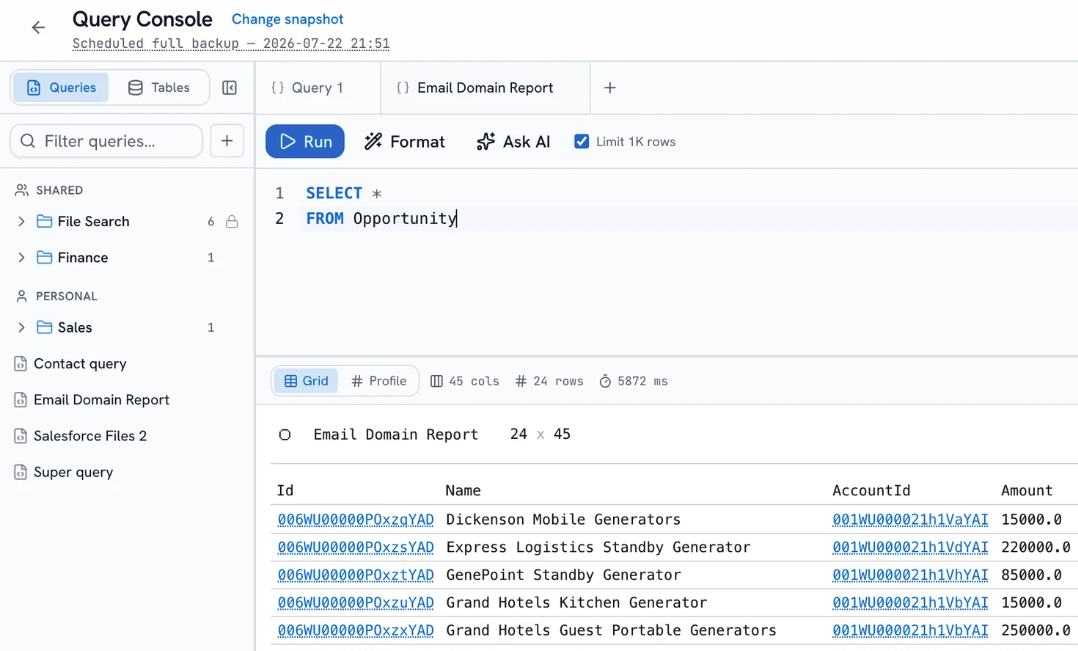
Any bluefactory snapshot opens in a SQL console: schema sidebar with typed columns, joins, and aggregates, a saved query library shared with the team, CSV export, and a plain-English bar that writes the SQL for you. "What did this pipeline look like in March" is a query against a snapshot, not a restore and not an API call against production.
The caveat
This is about what happens between incidents. For the incident itself, Backup and Recover's compare-and-restore is squarely aimed at exactly that job, and it is Salesforce's own code touching Salesforce's own objects.
The same captures do more than recovery
Because the snapshots are ordinary queryable data, they also drive the rest of the platform: archiving cold records to your storage, seeding a sandbox with a relationship-complete anonymized slice, finding duplicates, diffing metadata build over build, scoring effective user access, and answering questions about how the org is configured.
The caveat
Some of these have native or add-on equivalents from Salesforce, bought separately. The claim here is that they run off one set of captures, not that no other tool does them.
Side by side
The three native columns are what Salesforce documents. Where a row is blank, we could not find it documented for that option.
| Capability | Recycle Bin | Data Export | Backup and Recover | bluefactory |
|---|---|---|---|---|
| What it costs | Included | Included | Paid add-on | Free on one org, paid plans above it |
| What it captures | Deleted records only | Your data, exported as CSV files | Data, attached files, metadata, managed packages and sandboxes | Records, files, and supported Salesforce metadata types, captured together in one run |
| How often | Continuous, but only for deletions | Weekly, or monthly on Professional | Daily | The schedule you set plus on demand, as full snapshots or incremental chains with a recurring full |
| How long it is kept | 15 days, or 30 if Support enables extended retention | You keep the files; Salesforce does not retain them for you | 99 years by default, with daily, weekly, monthly, and yearly policies per org | For as long as you keep them in your bucket |
| Where it is stored | In your org | Downloaded by you, wherever you put it | Salesforce | Your own S3, Azure Blob or Google Cloud bucket, or bluefactory-managed if you prefer |
| Restore | Undelete, within the retention window | Manual re-import, and you rebuild the relationships | Compares the org against the backup to restore the objects, fields, and records that changed | Every insert, update, and skip listed for review before anything is written, rebuilt in dependency order |
| Restore scope | not documented | not documented | not documented | Whole objects, specific records, or individual fields. Anything outside the scope is never written to |
| SQL over a snapshot | not documented | not documented | not documented | Schema sidebar, joins, saved query library, CSV export and a plain-English bar that writes the SQL |
| Metadata diffs | not documented | not documented | not documented | A full metadata snapshot each build, every captured change as a side-by-side diff with per-component history |
| Archiving | not documented | not documented | not documented | Cold records and files moved to storage you own, captured, and verified before anything is deleted |
| Sandbox seeding and masking | not documented | not documented | not documented | A filtered, relationship-complete slice of production with sensitive fields anonymized on the way in |
| Duplicate detection and merge | not documented | not documented | not documented | Scan a snapshot for duplicate groups and merge each to one record. Dry run by default, live merges reversible |
| Effective user access analysis | not documented | not documented | not documented | Scored from captured metadata joined with live assignments, for the 200 most recently active users, every grant traced to its source |
“not documented” means we could not find it in the vendor's public documentation, not that it does not exist.
What a CSV export can never be
The weekly export gives you files. bluefactory gives you the same data as something you can ask questions of.
No API cost
The query runs against the snapshot, so the live org never sees it.
Any point in time
Point the console at last night's run, or one from six months ago.
Plain English works
Describe the question and the console writes the SQL for you.
Shared with the team
Saved queries live in a library, personal or shared with the org.
Straight answers
The questions a buyer actually asks when they are weighing these two, answered without hedging.
Want a demo? Book a demo
Doesn't Salesforce already back up my org?
Salesforce backs up the platform for its own disaster recovery, which is not the same as being able to recover your org from your own mistake. For that you have three options: the Recycle Bin for deletions inside 15 days, the scheduled Data Export for CSV files you manage yourself, or the paid Backup and Recover add-on, which is a genuine backup product. The shared responsibility model puts recovering your data from your own bad import on you, not on Salesforce.
Is the weekly Data Export enough?
It is enough to have a copy, and it costs nothing. It is not enough to recover quickly: the output is CSV files with no restore engine behind them, so putting a broken parent-child hierarchy back means rebuilding relationships by hand during an incident. If it is what you have today, keep it running while you evaluate anything else.
Should I just buy Salesforce Backup and Recover?
If your requirement is recovery and you value one vendor, one bill and nothing new to security review, that is a reasonable buy and we would rather you knew that from us. Teams pick bluefactory when they want the snapshot itself to be useful: query it in SQL, diff metadata across builds, archive from it, seed a sandbox from it, and keep it in their own cloud storage. Some run both.
Can I run bluefactory alongside the native add-on?
Yes. bluefactory connects over its own Salesforce OAuth grant and writes to your storage, so nothing conflicts with a native backup running in parallel. Keeping the add-on for recovery and bluefactory for the data layer is a setup we see.
How long does bluefactory keep my backups?
For as long as you choose to keep them. In your own bucket, retention is your bucket's lifecycle policy and the files stay in your cloud account whatever happens to your subscription. Salesforce documents 99 years of retention by default on Backup and Recover, which outruns anything we would claim, and that is a fair point in its favour.
Does bluefactory back up metadata?
It captures the supported Salesforce metadata types in your tracker's scope as a full snapshot on every build, and opens every captured change as a side-by-side diff with per-component history. What it does not do is deploy metadata into an org. The coverage page documents how the scope is derived and where it ends.
How we compiled this
Every claim about another product on this page comes from that vendor's own public documentation, read on 9 August 2026. Products change, so check the current pages before you decide, and tell us if anything here is out of date. We will fix it.
- salesforce.com/platform/data-backup-recovery
- help.salesforce.com, Back Up Data with Salesforce Backup and Recover
- help.salesforce.com, Salesforce Backup Retention Policies
- help.salesforce.com, Export Backup Data from Salesforce
- help.salesforce.com, Manage the Recycle Bin
- help.salesforce.com, Enable Extended Recycle Bin Retention
Salesforce and Salesforce are trademarks of their respective owners. bluefactory is not affiliated with, endorsed by, or sponsored by them.
Compare bluefactory with something else
bluefactory vs Gearset
A DevOps platform with backup built in, next to a data platform built around the snapshot.
Read itbluefactory vs Odaseva
An enterprise compliance platform, next to one your team can start on by itself today.
Read itbluefactory vs GRAX
The closest thing to a shared premise: your data, your cloud. What each one gives you on top.
Read itSee it against your own org
Add an org and bluefactory takes the first snapshot on its own.
Free for one org, no credit card.