
bluefactory vs Odaseva
Odaseva was built for the largest, most regulated Salesforce estates in the world. bluefactory was built so a team can protect an org this afternoon. Both are real answers, to different questions.
Two different starting points
Both protect Salesforce data. They were built to solve different problems first, and that is what should decide it.
Choose Odaseva if
Regulation and scale set your requirements before features do.
- You have data residency obligations that dictate which borders your backup may sit inside, and you need a vendor who treats that as a first-class product decision.
- You want to hold the encryption keys yourself, on a no-view model where the provider cannot decrypt your data.
- Your org is large enough that Salesforce API limits are an engineering problem. Odaseva documents parallelized extraction and API consumption prediction built for exactly that.
- You need consumer rights (Right of Access and Right of Erasure) handled as a documented workflow, alongside ISO 27001, SOC 2, HIPAA and GDPR alignment.
Choose bluefactory if
You want to be protected today and get value from the data all month.
- You want the first snapshot running in minutes, free, without a procurement cycle or an implementation project.
- You want the snapshot to be a database you can query in SQL, not only a recovery artefact.
- You want backup, archive, seeding, dedupe, metadata diffs and access review running off one set of captures, on one bill.
- You want the bytes in your own S3, Azure or Google Cloud bucket, under your keys.
Where they actually differ
Three differences worth deciding on, each with the side where Odaseva is the better answer.
How you get started
bluefactory is self-serve. You add an org, the first snapshot runs on its own, and one org is free with no credit card. There is no implementation phase between deciding and being protected, which matters most to the teams who have been meaning to sort backup out for two quarters.
The caveat
Self-serve is a trade. Odaseva's engagements come with the architects, the runbooks and the enterprise onboarding that a regulated multi-org estate genuinely needs, and no amount of instant sign-up substitutes for that on a programme of that size.
The snapshot is a database
Any bluefactory backup opens in a SQL console: a schema sidebar with typed columns, joins, and aggregates, a saved query library shared with the team, CSV export, and a plain-English bar that writes the SQL for you. It runs against the snapshot, so "what did this look like in March" never spends an API call against production.
The caveat
Odaseva documents an analytics product and cloud replication of its own, so getting Salesforce data somewhere it can be analysed is not a gap on their side. The difference is that ours is a console over the backup itself, not a pipeline to somewhere else.
Compliance depth is theirs
bluefactory covers the ground a Salesforce team usually needs: data compliance records for forget and rectify requests applied at restore time, anonymization on the way into a sandbox, IP allowlisting, role-based access per module and per org, and encryption at rest. That is a working compliance posture, honestly stated.
The caveat
It is not the same as Odaseva's. If your requirements name specific residency borders, a no-view key model, or a documented consumer-rights workflow you will be audited against, Odaseva is built for that and this page will not pretend we match it feature for feature.
Side by side
Odaseva's column is what Odaseva documents publicly. Where a row is blank, we could not find it documented.
| Capability | Odaseva | bluefactory |
|---|---|---|
| Who it is built for | Enterprises, with a platform designed by Salesforce CTAs around large data volumes and regulated estates | Salesforce teams of any size, self-serve from one free org upward |
| Getting started | not documented | The first snapshot runs on its own. One org free, no credit card |
| Backup and restore | Enterprise backup and restore, with change capture allowing restore to previous versions | Scheduled and on-demand snapshots, full or incremental with a recurring full, restored in dependency order |
| Restore preview | not documented | Every insert, update, and skip listed for review before anything is written |
| Where backups are stored | Data residency options so backups stay within required borders | Your own S3, Azure Blob or Google Cloud bucket, or bluefactory-managed if you prefer |
| Encryption keys | Bring your own key, on a no-view model where the provider cannot decrypt your data | Encrypted at rest. In your own bucket, your cloud provider's key management applies |
| Archiving | Removes and archives data from Salesforce while keeping it accessible and meeting regulatory standards | Cold records and files moved to storage you own, captured, and verified before anything is deleted |
| Sandbox seeding | Seeding with unlimited parent-child relationships, managed packages and custom objects | A filtered, relationship-complete slice of production, with the same scope builder the other modules use |
| Anonymization | Sandbox Data Anonymization for personal information placed in a sandbox | Sensitive fields anonymized on the way into the sandbox |
| Consumer rights and privacy | Right of Access and Right of Erasure managed directly from Salesforce records | Forget and rectify requests recorded per record or field and applied by the engine at restore time |
| API limit engineering | Parallelized extraction over their own API layer, with AI-driven API consumption prediction and limiting | not documented |
| SQL console over a snapshot | not documented | Schema sidebar, joins, saved query library, CSV export and a plain-English bar that writes the SQL |
| Metadata diffs | not documented | A full metadata snapshot each build, every captured change as a side-by-side diff with per-component history |
| Duplicate detection and merge | not documented | Scan a snapshot for duplicate groups and merge each to one record. Dry run by default, live merges reversible |
| Effective user access analysis | not documented | Scored from captured metadata joined with live assignments, for the 200 most recently active users, every grant traced to its source |
| Metadata assistant | not documented | Ask how a field is populated or what a Flow does, answered from your snapshots with the components cited |
“not documented” means we could not find it in the vendor's public documentation, not that it does not exist.
Enterprise answers without the enterprise runway
The questions that usually need a data warehouse project are a query against last night's snapshot here.
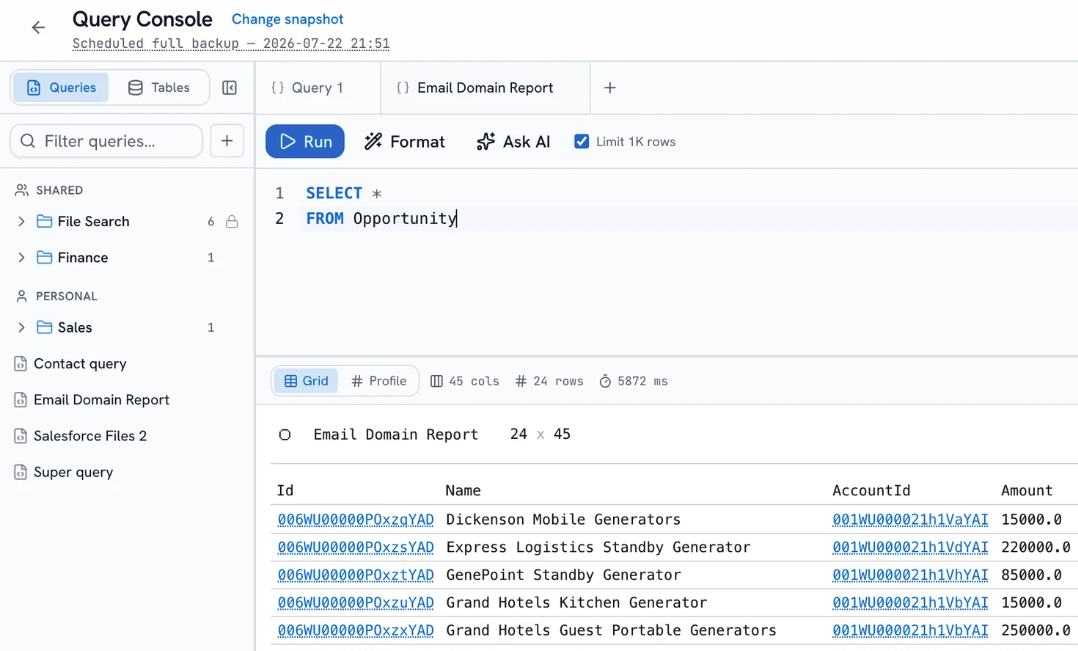
No API cost
The query runs against the snapshot, so the live org never sees it.
Any point in time
Point the console at last night's run, or one from six months ago.
Plain English works
Describe the question and the console writes the SQL for you.
Shared with the team
Saved queries live in a library, personal or shared with the org.
Straight answers
The questions a buyer actually asks when they are weighing these two, answered without hedging.
Want a demo? Book a demo
Should I just use Odaseva?
If your requirements are written by a compliance function: named data residency borders, keys you hold on a no-view model, an audited consumer-rights workflow, or your org is large enough that Salesforce API limits are an engineering problem, Odaseva is built for precisely that and we would rather tell you so. Teams pick bluefactory when they want to be protected quickly and want the snapshot to be something they work with, not only a recovery artefact.
Is bluefactory enterprise-ready?
It runs the controls a Salesforce team normally needs: tenant isolation on every query, role-based access per module and per org, per-account IP allowlisting, encryption at rest, backups in your own cloud bucket, and an audit trail of who ran what. Whether that clears your specific bar is a question worth putting to us directly rather than reading off a page. The security page has the detail, and we would rather scope it honestly than oversell it.
Can I keep my backups in my own cloud?
Yes. bluefactory writes every snapshot to your own Amazon S3, Azure Blob or Google Cloud bucket: your account, your region, your keys. bluefactory-managed storage is available if you would rather not run one. If they are in your bucket, cancelling bluefactory does not move or delete them.
How big an org can bluefactory handle?
Backups run as full snapshots or as incremental base-plus-delta chains with a recurring full, so a large org is not re-extracted from scratch every night and a restore never replays unbounded history. Odaseva documents parallelized extraction and API consumption prediction aimed at the very largest estates. If you are at that scale, ask us about your volumes before you switch rather than after.
Does bluefactory handle GDPR requests?
It records data compliance requests: forget a record, or rectify a field, against the org, and the engine applies them at restore time so erased data is not silently reintroduced by a recovery. Sandbox seeding anonymizes sensitive fields on the way in. Odaseva documents a broader consumer-rights product, including Right of Access, managed directly from Salesforce records.
Can I run both?
Yes. Each connects over its own Salesforce OAuth grant, and bluefactory writes to your storage rather than competing for anyone else's. Running Odaseva for a regulated primary estate and bluefactory on the orgs that need to move faster is a reasonable setup.
How we compiled this
Every claim about another product on this page comes from that vendor's own public documentation, read on 9 August 2026. Products change, so check the current pages before you decide, and tell us if anything here is out of date. We will fix it.
- odaseva.com/products/data-backup-restore
- odaseva.com/salesforce-data-protection
- odaseva.com/products/salesforce-data-archiving
- odaseva.com/salesforce-sandbox-seeding
- odaseva.com/products/salesforce-data-privacy
Odaseva and Salesforce are trademarks of their respective owners. bluefactory is not affiliated with, endorsed by, or sponsored by them.
Compare bluefactory with something else
bluefactory vs Salesforce
The Recycle Bin, the weekly export and the paid backup add-on, and where each one stops.
Read itbluefactory vs Gearset
A DevOps platform with backup built in, next to a data platform built around the snapshot.
Read itbluefactory vs GRAX
The closest thing to a shared premise: your data, your cloud. What each one gives you on top.
Read itSee it against your own org
Add an org and bluefactory takes the first snapshot on its own.
Free for one org, no credit card.